ArchiCAD Overview
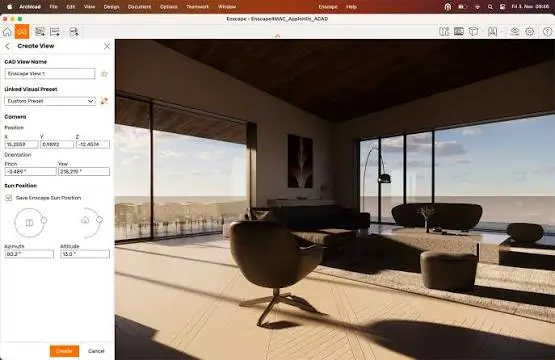
ArchiCAD for Mac is Building Information Modeling (BIM) software built for architects and design teams. It handles modeling, documentation, and visualization in one workspace. Parametric tools like Walls, Doors, and Roofs update automatically as your design changes. It runs natively on Mac, with Apple Silicon delivering noticeably faster file opening and rendering than older Intel Macs. Teams can collaborate in real time using BIMcloud. Files stay fully compatible across Mac and other platforms. A built-in AI Assistant helps speed up documentation and design tasks. Clash detection and issue tracking are built in too, helping catch problems before construction starts.
Why Choose ArchiCAD for Mac
ArchiCAD has run natively on Mac since the original Macintosh launched. That native history shows in how well it performs on current Apple Silicon chips.
File opening and rendering are noticeably faster on M-series Macs than on older Intel hardware. For large projects, that speed difference adds up fast. Team collaboration also works smoothly through BIMcloud, letting multiple people edit the same model at once.
Key Features
- Parametric modeling with Walls, Doors, Windows, Roofs, and Stairs
- Real-time team collaboration through BIMcloud
- Built-in AI Assistant for faster documentation
- AI Visualizer for near-photorealistic renders from your model
- OpenBIM support, including IFC and BCF standards
- Automated construction documentation that updates with your design
- Built-in clash detection and issue tracking
- BIMx for viewing models on iOS and Apple Vision Pro
- Native performance on both Apple Silicon and Intel Macs
What's New in 29.0.2 Version
ArchiCAD 29 focuses on AI-assisted design and Mac performance. Recent updates include:
- A built-in AI Assistant for streamlined documentation
- AI Visualizer for generating realistic renders from your model
- Continued Apple Silicon performance improvements
- Expanded BIMx support for Apple Vision Pro
- These additions push ArchiCAD further into AI-assisted workflows while keeping its core modeling tools consistent.
Supported macOS Versions
ArchiCAD runs natively on Apple Silicon and Intel Macs. Apple Silicon Macs handle large files noticeably faster, especially during rendering and section updates. For exact system requirements, check Graphisoft's requirements page before installing.
How to Install ArchiCAD on macOS?
Setting up ArchiCAD on your Mac takes just a few steps.
- Download the latest version of ArchiCAD for Mac.
- Open the downloaded installer file.
- Follow the on-screen instructions to complete installation.
- Launch ArchiCAD from your Applications folder.
- Sign in or start your free trial to begin working.
- Once installed, you can open a sample project or start a new model right away.
How to Use ArchiCAD Mac?
- Open ArchiCAD and create a new project or open an existing file.
- Use parametric tools like Wall and Door to start building your model.
- Switch between 2D documentation and 3D views as you design.
- Connect to BIMcloud if you're collaborating with a team.
- Use the AI Assistant for help with documentation tasks.
- Export your finished documents or renders when ready.
Final Verdict
ArchiCAD remains a strong choice for architects working on Mac, backed by decades of native support and real Apple Silicon speed gains. Its AI Assistant and BIMcloud collaboration add genuine value for teams. Pricing and the subscription-only model are worth weighing against your studio's budget, but the free trial makes that easy to test first.
Download ArchiCAD for Mac Latest Version
Ready to design your next project in a native Mac BIM tool?
Download ArchiCAD for Mac to model, document, and collaborate on architectural projects, with AI tools built in. Whether you're running a small studio or a larger team, ArchiCAD gives you a fast, native workflow built specifically for Mac.